

Key Takeaways
- Wearable tech covers at least five distinct device categories, each with a different primary purpose.
- Smartwatches and fitness bands overlap in features but differ significantly in scope and complexity.
- Wireless earbuds are considered wearables and now include health-tracking features in some models.
- Ecosystem compatibility — whether a device works with your phone — is one of the most important buying factors.
- Most people only need one or two wearable categories to meet their daily goals.
Start here
What "Wearable Tech" Actually Means
Next
The Main Categories: What Each One Does
Build vocabulary
Key Concepts Every New Buyer Should Know
Make your decision
How to Figure Out Which Category Is Right for You
Before you buy
Common Pitfalls to Avoid
What "Wearable Tech" Actually Means
Wearable technology refers to any electronic device designed to be worn on the body — on your wrist, in your ears, or even clipped to clothing. These devices connect to your smartphone or home network to extend functionality beyond what your phone does on its own.
The category has grown rapidly. Today it spans smartwatches, fitness bands, wireless earbuds, smart glasses, and emerging health monitors. Each type solves a distinct problem, which is why understanding the landscape before shopping can save you real frustration. If you want frameworks for cutting through choice overload more broadly, the Smarter Decisions hub offers practical buying guidance across many categories.
The Main Categories: What Each One Does
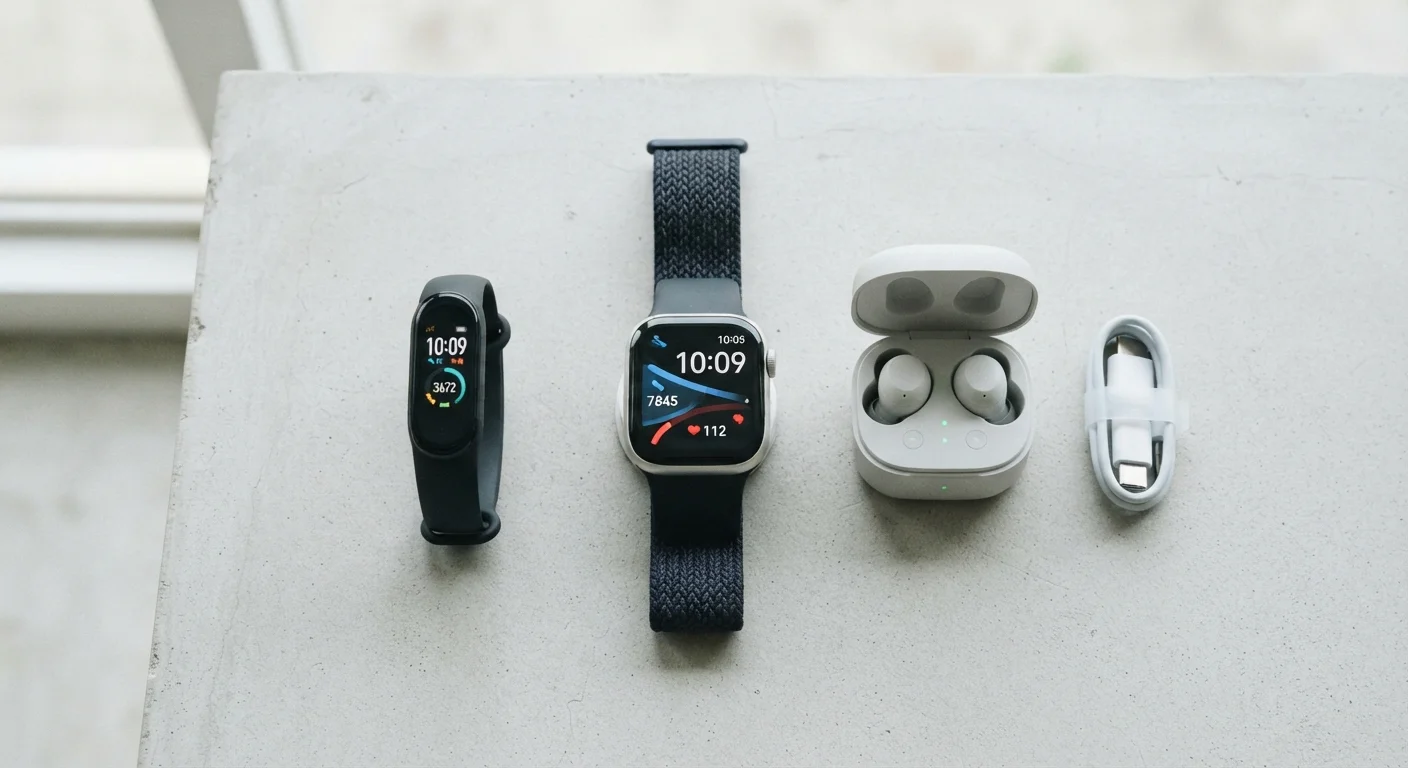
Here is a plain-language breakdown of the major wearable categories you will encounter:
- Smartwatches
- The most feature-rich wrist wearable. Smartwatches display notifications, run apps, track fitness metrics, and often support contactless payments. Many models include GPS for route tracking and heart rate sensors. See our full smartwatch feature breakdown for a detailed look at what these features actually do.
- Fitness Bands
- Slimmer and simpler than smartwatches. These focus on step counting, sleep tracking, and basic heart rate monitoring. Battery life is usually longer because they do less. A good choice if your only goal is habit tracking.
- Wireless Earbuds
- Primarily audio devices, but increasingly capable of tracking heart rate and detecting your physical posture. The wearable angle here is passive — they gather data while you listen. Active noise cancellation (ANC) — technology that uses microphones to block out ambient sound — is a common differentiator.
- Smart Glasses
- An emerging category that overlays information on your field of vision or integrates audio. Still maturing, with limited mainstream adoption.
- Dedicated Health Monitors
- Devices designed specifically around a health metric — continuous glucose monitors (CGMs), for example, which track blood sugar levels throughout the day. These are typically tied to specific medical or wellness programs.
Ecosystem
The platform or operating system a device is built around, typically iOS or Android. Wearables often work best — or only fully — within their intended ecosystem.
Active Noise Cancellation (ANC)
A technology in some earbuds that uses built-in microphones to detect and cancel out surrounding sounds, reducing what you hear from the environment.
GPS
A satellite-based location system. In wearables, onboard GPS means the device can record your route and distance without needing your phone nearby.
Heart Rate Sensor
A small optical sensor on the back of a wearable that estimates your pulse by detecting blood flow under the skin. Useful for fitness tracking but not a medical-grade measurement.
Continuous Glucose Monitor (CGM)
A wearable sensor that tracks blood sugar levels throughout the day, typically used in diabetes management under medical supervision.
Contactless Payment
A feature that lets you pay at a store terminal by tapping your smartwatch, without needing your phone or physical card.
Key Concepts Every New Buyer Should Know
Before you shop, these foundational terms will appear on every product page and review you read. Understanding them upfront prevents confusion later.
Check Compatibility Before Anything Else
Before evaluating any wearable's features, confirm it works with your specific phone model and operating system. Some devices list broad compatibility but restrict key features — like app control or health syncing — to a single platform. A quick search for "[device name] + [your phone OS] compatibility" takes two minutes and prevents a frustrating return.
One term worth flagging immediately: ecosystem. In wearables, ecosystem refers to the platform your device is built around — usually tied to your smartphone's operating system. A device designed for Android may offer fewer features when paired with an iPhone, and vice versa. Always verify compatibility before purchasing.
How to Figure Out Which Category Is Right for You
Rather than starting with devices, start with your daily routine. Ask yourself what friction point you are actually trying to solve:
- Want to stay connected without pulling out your phone? A smartwatch handles notifications and quick replies on your wrist. Our guide on getting started with a smartwatch walks you through initial setup.
- Want to build a movement or sleep habit? A fitness band offers less distraction and longer battery life.
- Want better audio with passive health insights? Wireless earbuds serve dual duty.
- Want to monitor a specific health metric? Look at dedicated monitors, ideally in conversation with a healthcare provider.
Most people only need one category. Buying multiple overlapping devices tends to create redundant data and charging friction, not better results. It is also worth knowing upfront that many features sound compelling on a spec sheet but rarely get used day-to-day. Our piece on smartwatch features most people never use offers an honest take on this.
Common Pitfalls to Avoid
New wearable buyers tend to run into the same set of avoidable problems:
Wearable Health Data Is Not Medical Advice
Metrics like heart rate estimates, blood oxygen levels, and sleep scores from consumer wearables are designed for general wellness awareness — not clinical diagnosis. These readings can be affected by device fit, skin tone, movement, and other variables. Do not use wearable data to make medical decisions. Always consult a qualified healthcare professional for any health concerns.
- Buying for features you will not use. A long feature list is marketing, not utility. Focus on the two or three things you will actually do every day.
- Ignoring platform compatibility. Check that the device fully supports your phone's operating system before purchase.
- Underestimating charging habits. A device that needs daily charging only helps you if you are disciplined about plugging it in. Match battery life expectations to your real routine.
- Treating health data as medical diagnosis. Wearable health readings — heart rate estimates, blood oxygen levels — are wellness indicators, not clinical measurements. Always consult a qualified healthcare professional for medical concerns.
Wearables work best when they fit quietly into a routine you already have, rather than demanding you build a new one around them. Use this map as your starting point, then narrow down to the category that matches your actual day.
For a broader look at phones and tablets that pair with these devices, the Smartphones & Tablets hub covers the essentials in plain language.